CI/CD Introduction and Overview
Introduction to CI/CD
Consolidated from Introduction_to_CI_CD.md.
Preserved content excerpts (from Introduction_to_CI_CD.md)
What is CI/CD?
- CI/CD is a methodology and toolchain for integrating and shipping small changes frequently.
- It reduces “integration hell” by continuously merging work and validating it automatically (builds/tests).
- It requires both technical practices (automation, tests, reproducible builds) and cultural practices (small PRs, fast feedback, fix-the-build discipline).
Continuous Integration (CI)
- CI is the practice of integrating changes into a shared codebase frequently.
- Automation (build + tests + lint) is the baseline “confidence gate” before merging.
Continuous Delivery vs Continuous Deployment (CD)
- Continuous Delivery: the software is always deployable, but promotion to production may require approval.
- Continuous Deployment: changes that pass the pipeline are deployed automatically (often gated with feature flags / staged rollout).
Note: “environment” is overloaded (runtime environment, environment variables, and GitHub Environments).
For a cross-platform terminology table (Jenkins/GitHub Actions/GitLab/CircleCI), see the CI/CD Overview and Diagram section below.
CI/CD Overview and Diagram
Consolidated from CI_CD_Overview_and_Diagram.md with process summary, artifacts, deployment strategies, and cross-platform terminology table.
Preserved content excerpts (from CI_CD_Overview_and_Diagram.md)
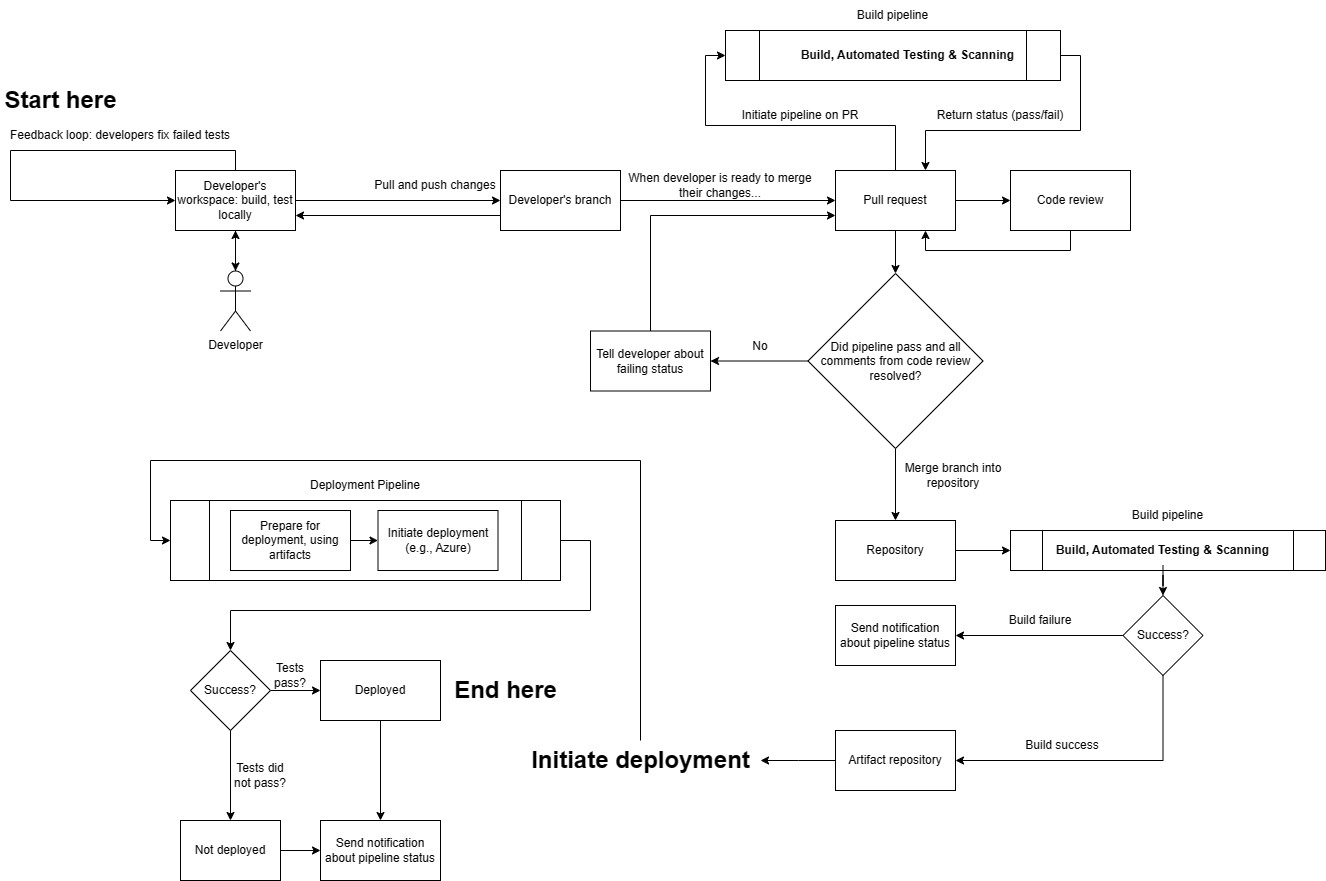
What’s happening in the diagram
- After tasks are broken down, developers implement them and open a pull request (PR). This triggers a CI pipeline (build, test, lint). The pipeline must succeed before the PR is merged.
- A successful CI run publishes build artifacts to an artifact repository. At this stage, artifacts exist but are not yet customer-accessible.
- A deployment pipeline (CD) promotes a selected artifact to an environment using infrastructure as code (IaC) so infrastructure and configuration are reproducible (avoid “snowflake” machines).
- CD can deploy work-in-progress safely when the feature is gated behind a feature flag (code can be present in production but inactive).
- Common rollout strategies include:
- Blue/green: two environments (blue = current, green = new) for zero-downtime cutover.
- Incremental/canary: release to a subset first, then gradually increase exposure.
- Deployment does not necessarily mean release: deploy, deliver, and release are distinct concepts in modern pipelines.
- Post-deploy, use continuous monitoring so issues can be detected quickly and rollbacks can occur if needed.
Common steps in build/deploy workflows
- Trigger: pipeline runs on events (PR opened, merge to main, etc.).
- Checkout and dependencies: runner checks out repo and restores dependencies from trusted sources.
- Compilation/build: compile/transpile where applicable (language-dependent).
- Linting/static analysis (optional): style, quality, and some bug patterns.
- Automated tests:
- Unit tests
- Integration tests
- End-to-end tests
- Artifact publishing: publish immutable build outputs to an artifact repository.
- Deployment: select an artifact and deploy to the target environment (often with additional checks).
Cross-platform terminology (CI/CD)
| Generic term | Definition | Jenkins | GitHub Actions | GitLab CI/CD | CircleCI |
|---|---|---|---|---|---|
| Build step | A single task/command as part of the build process. | Build Step | Job | Job | Job |
| Environment | The compute environment where build/tests run (OS/tools). | Node | Runner | Runner | Executor |
| Workflow | Sequence of jobs/steps defining the CI process. | Pipeline | Workflow | Pipeline | Workflow |
| Trigger | Event/condition that starts CI/CD. | Build Trigger | Event | Trigger | Trigger |
| Secrets | Sensitive build/deploy data (passwords, keys, tokens). | Credentials | Secrets | Variables | Environment Variables |
| Container | Isolated runtime environment for predictable execution. | Agent/Docker Agent | Container | Docker | Docker Executor |
| Configuration | File(s) that define the CI/CD behavior. | Jenkinsfile | .github/workflows/* | .gitlab-ci.yml | .circleci/config.yml |
| Artifacts | Files produced by builds (binaries, bundles, packages). | Build Artifacts | Artifacts | Artifacts | Artifacts |
| Cache | Temporary storage to speed up subsequent runs. | Workspace Cache | Cache | Cache | Cache |
| Parallelism | Ability to run jobs concurrently. | Parallel Builds | Matrix Builds | Parallel | Parallel Jobs |
| Build status | Outcome indicator (success/fail/in-progress). | Build Status | Check | Pipeline Status | Build Status |
Adopting CI/CD and Makefile Example
Consolidated from Adopting_CI_CD_and_Makefile.md with staged adoption advice and simple makefile.
Preserved content excerpts (from Adopting_CI_CD_and_Makefile.md)
Prerequisites
- Ensure the codebase is in version control (e.g., Git).
- Ensure you can build from the command line (no “IDE-only” builds).
Start small and iterate
- Start with a basic pipeline that builds your targets and notifies on failure.
- Treat the pipeline as production infrastructure: a broken pipeline must be fixed immediately.
- Add capabilities incrementally:
- Static analysis
- Unit tests (start with new code and high-risk areas)
- Formatting enforcement
- Metrics and dashboards (build time, artifact size, coverage)
- On-target testing (automate flashing + running + collecting results)
Makefile example
main.o: main.c mathFunctions.h utilFunctions.h gcc -c main.c
utilFunctions.o: utilFunctions.c utilFunctions.h gcc -c utilFunctions.c
mathFunctions.o: mathFunctions.c mathFunctions.h gcc -c mathFunctions.c